Skip to content
Printer Test Page: home

CMYK Test Page

Print a CMYK test page to check each ink on its own: cyan, magenta, yellow and black bars, 10-step tints and a fine-line pattern per color. It tells you which cartridge is failing before you replace the wrong one.

Paper size:
Tip: print at 100% scale

Set Scale to 100% (Actual size) and turn off "Fit to page". The ruler on the sheet should measure exactly 100 mm. If the print dialog shows a different paper size, pick Letter or A4 there too, or print the PDF.

Preview of the Letter sheet. It prints at full size.

How did it print?

Hold your printout next to the screen and pick what you see. You get the likely cause, the page to print next and what to do.

Pictures are illustrations of each problem, not photos of real prints.

What this CMYK test page checks

The page separates the four inks so you can judge them one at a time. It has four numbered zones, and the numbers on the paper match this list.

  1. Zone 1: Ink bars. One full-width bar for each ink, labeled Cyan, Magenta, Yellow and Black (K). Every bar uses a single ink, so a missing or streaky bar names the cartridge.
  2. Zone 2: Ink steps. Ten steps per ink, from 10 to 100%. Weak ink shows up first in the light steps; clogged nozzles show up as light lines through the dark ones.
  3. Zone 3: Line patterns. A zigzag of short, thin lines for each ink, each line a little higher or lower than the one before. A missing line means a group of nozzles did not fire.
  4. Zone 4: Size check. A 100 mm ruler and a 4 inch ruler to confirm the print was not scaled.
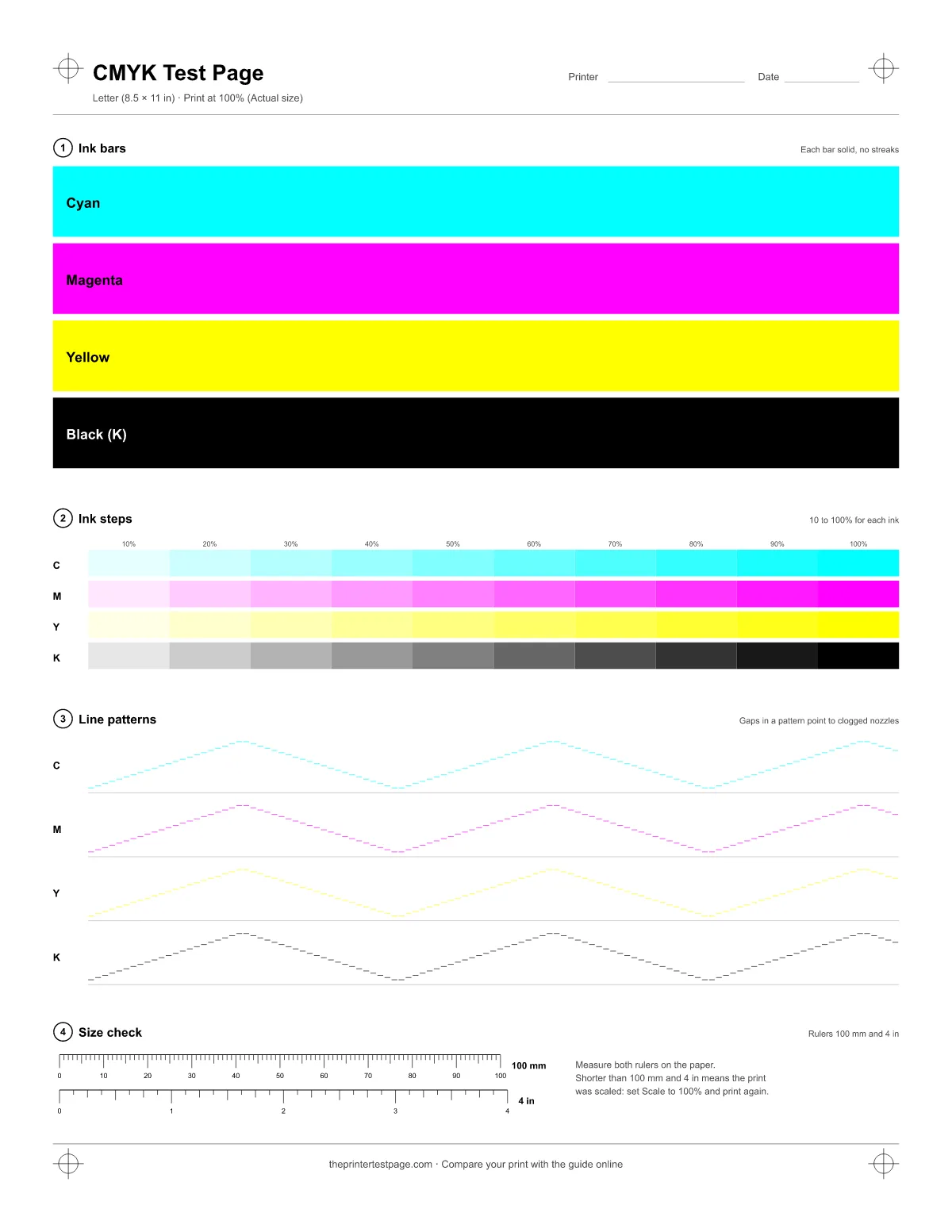
CMYK test page with separate cyan, magenta, yellow and black bars, 10-step tints and fine-line patterns (Letter)
CMYK test page, Letter size. Zone numbers match the list.

What CMYK means for your printer

CMYK stands for cyan, magenta, yellow and key, the printing term for black. Almost every color your printer makes is a mix of these four inks or toners: red is magenta plus yellow, green is cyan plus yellow, blue is cyan plus magenta. When one ink is weak, every color that uses it shifts.

That is why a CMYK test page prints each ink on its own. People also call it a 4 color test print: four bars, four sets of steps and four line patterns, one per cartridge. A color that fails here is the cartridge to look at, with no guessing from mixed colors.

How to print it

  1. Press Print test page at the top, or Ctrl + P (Command + P on a Mac).
  2. Pick your printer and the paper size you loaded: Letter or A4.
  3. Keep the scale at 100%. In Chrome and Edge, Default does that for this page; on a Mac, set Scaling to 100%.
  4. Print, then measure the 100 mm ruler. If it's shorter, the print was scaled.

Print in Color with Standard or Best quality. Draft mode uses fewer dots and can hide or exaggerate gaps in the line patterns.

Step-by-step help for Windows, macOS, Chromebook, iPhone and Android is in the printer test page guide.

Sources: Google Chrome Help: Print from Chrome (opens in a new tab); Microsoft Support: Print in Microsoft Edge (opens in a new tab); Apple Support: Print settings on Mac (opens in a new tab)

How to read each color

Check the four inks one by one, in daylight if you can.

  • Cyan: a clear sky blue. Weak cyan looks pale or greenish gray.
  • Magenta: a bright pink-purple. Weak magenta looks washed-out pink.
  • Yellow: bright and even. It always looks lighter than the others, so look for gaps and lines rather than strength.
  • Black (K): deep and solid. Gray or brownish black means low ink, or a printer mixing black from the color inks.

In zone 2, all ten steps of each ink should be visible and evenly spaced. If the 10% and 20% steps disappear for one ink only, that ink is running out.

Gaps in the line patterns

An inkjet print head usually has hundreds of tiny nozzles per color, lined up in rows. Each short line in zone 3 sits at a slightly different height, so it is printed by a different group of nozzles. When some nozzles are clogged, the lines they should print are missing or thinner than their neighbors.

  • A few scattered gaps: run the head cleaning once, then print this page again.
  • Gaps in the same place after two cleanings: let the printer rest for a few hours so fresh ink can soften the dried ink, then test again.
  • A whole pattern missing: that cartridge is empty, not seated properly, or still has its protective tape.
  • Lines doubled or offset: the nozzles work, but the head needs an alignment.

Your printer's own nozzle check uses the same idea with a pattern made for its exact head. The steps for HP, Epson, Canon and Brother are in the built-in test guide.

Which cartridge to replace

Clean first, replace second: a clogged nozzle and an empty cartridge look the same on the first print. If a color is still missing or faded after two cleanings and a few hours' rest, replace it.

  • Separate tanks for each ink: replace only the color that failed.
  • One tri-color cartridge plus black: cyan, magenta and yellow share one cartridge, so any failed color means replacing the whole color cartridge.
  • Print head built into the cartridge: a new cartridge also brings a new head, which fixes clogs that cleaning could not.
  • Color laser printer: replace the toner for the faded color. If marks repeat at even intervals down the page, the drum or imaging unit is more likely the cause.

FAQ

What does the K in CMYK stand for?

Key. In traditional printing, the black plate was the key plate that the other colors were lined up with. On your printer, K is simply the black ink or toner.

Is this the same as an all color test print?

Yes, for printers with four inks. An all color test print checks every ink, and this page does that one ink at a time. Photo printers with extra inks, such as light cyan, light magenta or gray, need the manufacturer's own nozzle check to test those as well.

Why do my colors look fine but the line pattern has gaps?

Solid areas hide small gaps because neighboring nozzles fill them in. Thin lines don't, so the pattern shows a clog before it becomes a visible streak in your photos and documents.

Can I use this page with a color laser printer?

Yes. A color laser printer also uses four toners. The bars and steps show a weak toner, and the black and white test page is a better check for fading and banding in black.